The ZKsync Prividium Prize Program rewards the first 10 Prividium ZKsync Chains active on mainnet with 10M ZK each! This document contains all relevant information and instructions for eligible prize winners to access their 10M ZK prize. 
Overview
Each eligible Prividium Prize winner verified by the ZKsync Foundation will be granted minting rights on 1 of the 10 prize capped minters. Read more about capped minters here.
Each prize capped minter will have:
- A minting cap of 10M ZK (able to mint up to 10M ZK)
- A 1M ZK/month minting limit
- An expiration date of December 31, 2027
Those with the minter role will be able to mint up to 1M ZK per month from their designated prize capped minter. The minter role address will be able to specify the following parameters in the transaction:
- Amount of ZK to mint (in unit256) - up to 1M ZK/ month
- Target address to receive the minted ZK
This allows recipients more flexibility and autonomy over when and how they mint and distribute their prize.
Minter Role Address
Please share the desired minter role address with the ZKsync Foundation. The address should be a ZKsync mainnet address.
The minter role address does not have to be the same as the desired receiving address. As noted above, the minter role address is able to specify with each mint the target address of the mint.
For security reasons, this address should be a multisig with at least a 2/4 signer threshold.
How to Mint
Reminder: If you try to mint over the 1M ZK monthly mint limit, you will receive an error in your minting request.
From an EOA
- Go to your capped minter address in the Era block explorer
- Connect your minter role address to the block explorer interface
- Go to Contract > Write > 3. mint
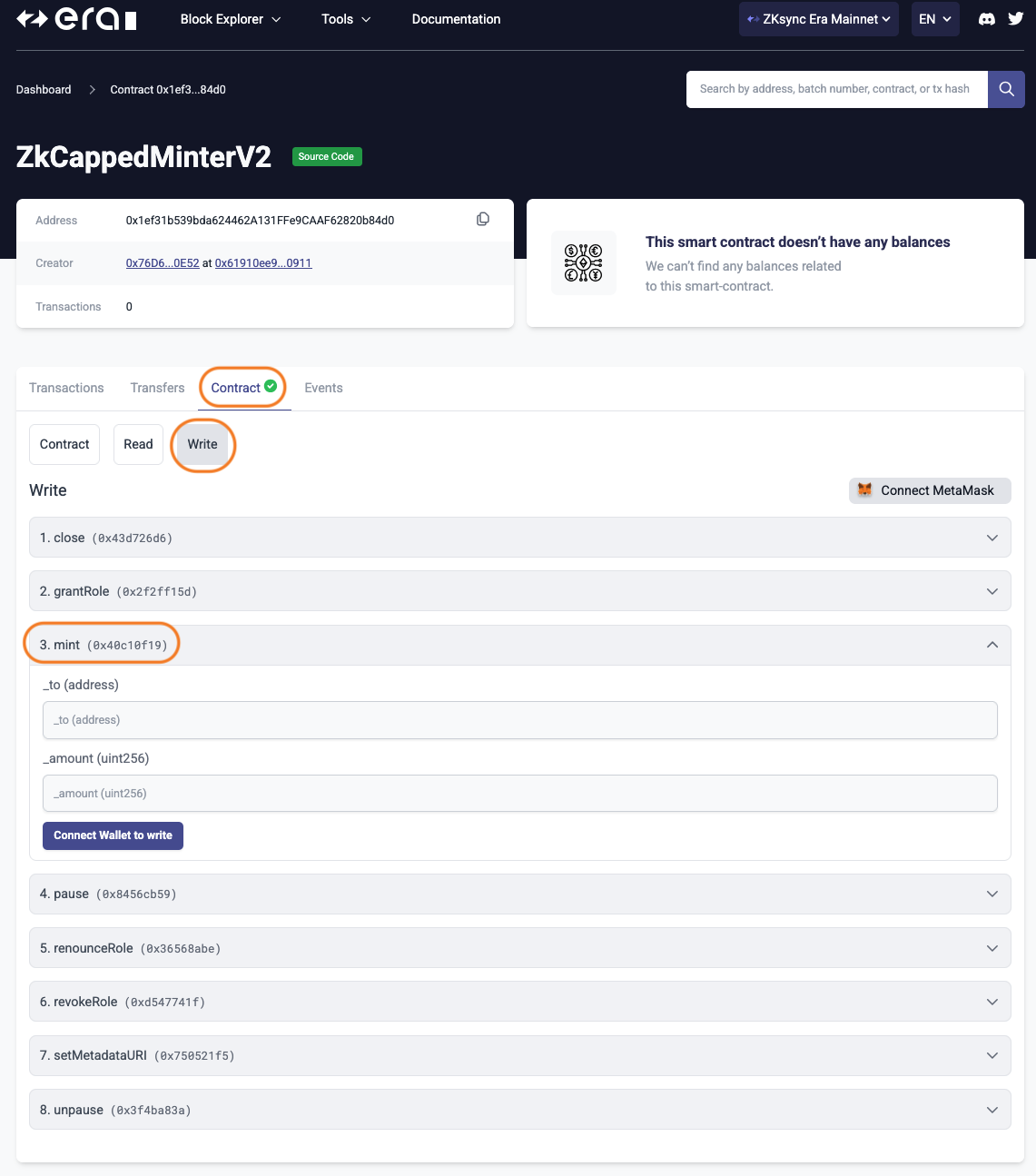
- Enter the target address that will receive the minter ZK (does not have to be same as minter role address)
- Enter the amount ZK to mint (up to 1M/month) in unit256 format
- Example: 1M ZK = 1000000000000000000000000 (amount + 18 zeros)
- Select “write” and sign transaction
- Confirm the mint was executed by visiting the target address on the block explorer to confirm receipt
From a SAFE
- Go to multisig address on the SAFE interface
- Select “Transaction Builder” > Custom Transaction
- Enter the address of your prize capped minter
- Enter ABI if necessary (can be found on Era block explorer under Contract > Contract > Contract ABI (copy/paste))
- Under Transaction Information > Contract Method Selector, select “mint”
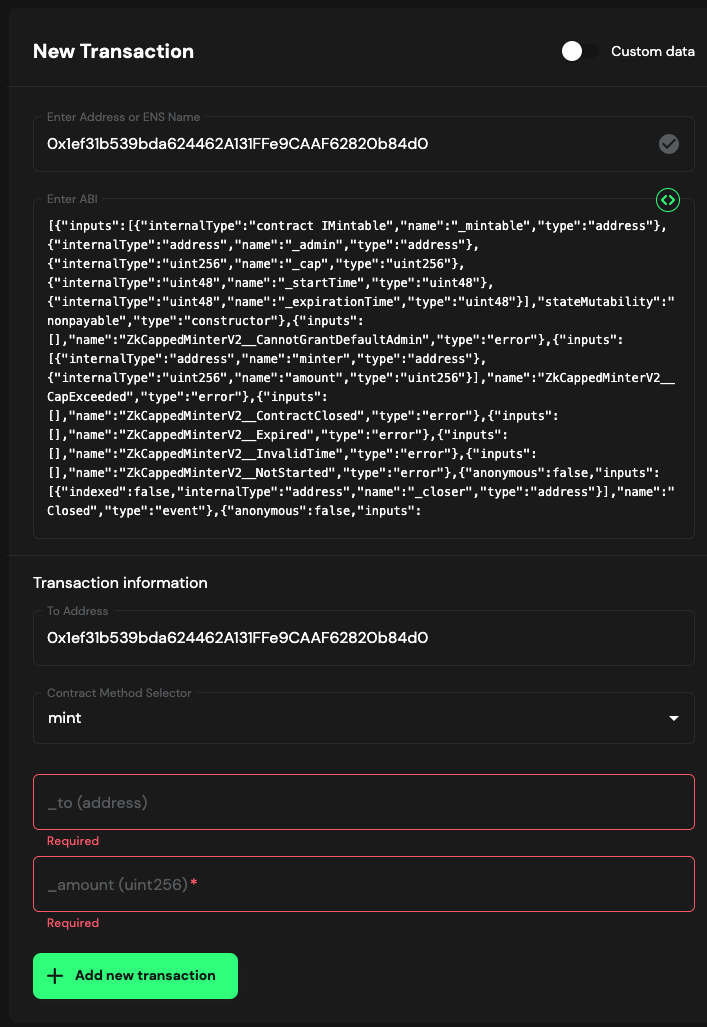
- Enter the target address that will receive the minter ZK (does not have to be same as minter role address)
- Enter the amount ZK to mint (up to 1M/month) in unit256 format
- Example: 1M ZK = 1000000000000000000000000 (amount + 18 zeros)
- Follow the instructions to finalize the transaction in the SAFE UI & collect signatures as needed
- Confirm the mint was executed by visiting the target address on the block explorer to confirm receipt
Managing Your Prize Capped Minter
- Minting Cadence: Prize winners are encourage to set a reminder in their calendars to mint once a month. Keep in mind that each prize capped minter expires on December 31st, 2027.
- Checking minted balance: You can always check how much has been minted from a capped minter by visiting your capped minter address in the Era block explorer > Contract > Read > 12. minted. You can also check the mint history under Events.
- Update minter role address: The address with the minter role can be updated if needed. Please let the Foundation know so they can arrange the change.
If you have any technical questions regarding your Prividium Prize capped minter, please contact me, Shelby, from the Governance Team for support.
This document was prepared by the ZKsync Governance Team per request of the ZKsync Foundation.